


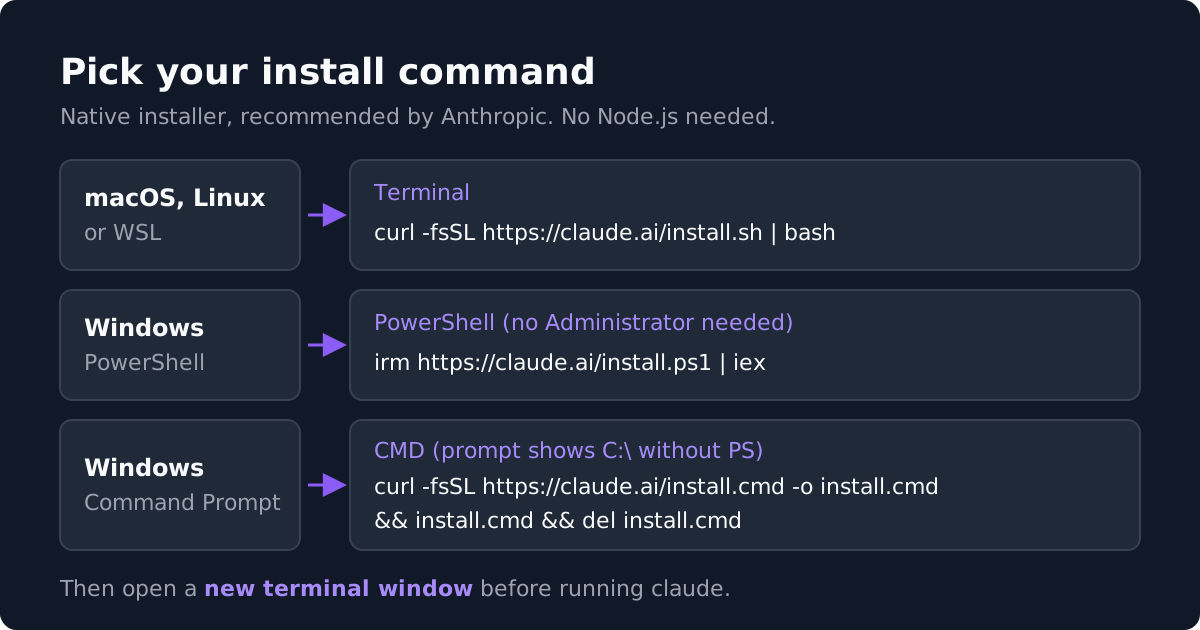
To install Claude Code, run curl -fsSL https://claude.ai/install.sh | bash on macOS, Linux or WSL, or irm https://claude.ai/install.ps1 | iex in Windows PowerShell, then open a new terminal and run claude. Installing Claude Code takes one command and about a minute. The hard parts are everything around it: which account you sign in with, whether to use the native installer or a package manager, what to do on Windows, and why your terminal says claude: command not found right after a "successful" install. This guide covers all of it, with commands as Anthropic documents them at code.claude.com as of October 2026, plus what Claude Code costs.
What You Need Before You Install
A supported operating system. Anthropic's setup docs list macOS 13.0 or later, Windows 10 version 1809 or later (or Windows Server 2019+), Ubuntu 20.04+, Debian 10+ and Alpine Linux 3.19+. You need at least 4 GB of RAM, an x64 or ARM64 processor, an internet connection, and one of Bash, Zsh, PowerShell or CMD. Claude Code requires 64-bit Windows; 32-bit editions are not supported. You also need to be in one of Anthropic's supported countries.
You do not need Node.js. This trips up people following older tutorials. The recommended native installer downloads a standalone binary. Node only matters if you choose the npm method, covered below.
A paid account of some kind. Installing is free, but the tool will not do anything until you sign in, and the free claude.ai plan does not include Claude Code. You have three options. A Claude subscription (Pro, Max, Team or Enterprise) is what Anthropic recommends for most individuals: usage draws from your plan allowance and you never see a token bill. A Claude Console account bills every request per token to your API organization, the same billing as an Anthropic API key. Or you can run Claude Code through Amazon Bedrock, Google Cloud's Agent Platform (Vertex AI) or Microsoft Foundry, where usage lands on your cloud bill. Decide which one before you install; we cover the cost of each at the end.
How to Install Claude Code on macOS, Linux and WSL
Option 1: the native installer (recommended). Open Terminal and run:
curl -fsSL https://claude.ai/install.sh | bashThe script shows no progress bar while it downloads, so give it a moment. It places the claude launcher at ~/.local/bin/claude. When it finishes, open a new terminal window before you test it, because the window you installed from keeps its old PATH. The native install is the only method that updates itself automatically in the background, which is the main reason to prefer it.
Option 2: Homebrew on macOS. If you manage everything through Homebrew:
brew install --cask claude-codeThere are two casks. claude-code tracks the stable channel, which Anthropic describes as typically about a week behind and skipping releases with major regressions. claude-code@latest gets every release as soon as it ships. Homebrew installs do not auto-update, so run brew upgrade claude-code (or brew upgrade claude-code@latest) yourself, and brew cleanup occasionally, since Homebrew keeps old versions on disk.
Option 3: apt, dnf or apk on Linux. Anthropic publishes signed package repositories for Debian and Ubuntu (apt), Fedora and RHEL (dnf), and Alpine (apk), each with a stable and a latest channel. Setup involves adding a signing key and a repository line, so copy the commands from the advanced setup page rather than a blog post, and check the key fingerprint it lists. Package manager installs do not auto-update through Claude Code; upgrades come through your normal apt upgrade or dnf upgrade.
Option 4: npm. The npm package is still supported and not deprecated, but Anthropic now lists it under advanced options rather than as the main path. It requires Node.js 22 or later and installs the same native binary as the standalone installer:
npm install -g @anthropic-ai/claude-codeDo not prefix this with sudo; Anthropic warns it causes permission and security problems. To upgrade an npm install, run npm install -g @anthropic-ai/claude-code@latest, not npm update -g, which can leave you on an old release. Unless you have a specific reason to keep Claude Code inside your Node toolchain, use the native installer instead.
How to Install Claude Code on Windows
Claude Code now runs natively on Windows, so WSL is optional. The first decision is where your projects live. Native Windows is right for Windows-native projects and tools. WSL 2 is right if you work in a Linux toolchain, and it is the only Windows option that supports Claude Code's sandboxed command execution. WSL 1 works if WSL 2 is unavailable.
Native Windows, from PowerShell. You do not need to run as Administrator. Open Windows PowerShell (not the "x86" entry in the Start menu, which is 32-bit and triggers an unsupported-platform error) and run:
irm https://claude.ai/install.ps1 | iexNative Windows, from Command Prompt. If your prompt shows C:\ without a leading PS, you are in CMD. Use this instead:
curl -fsSL https://claude.ai/install.cmd -o install.cmd && install.cmd && del install.cmdIf you see "The token '&&' is not a valid statement separator", you pasted the CMD command into PowerShell. If you see "'irm' is not recognized", you pasted the PowerShell command into CMD.
Native Windows, with WinGet. If you prefer a package manager, run winget install Anthropic.ClaudeCode. Like Homebrew, WinGet installs do not auto-update; run winget upgrade Anthropic.ClaudeCode periodically.
Is Git Bash required? Not anymore. Older guides said Claude Code needed Git for Windows. Today it is optional: without it, Claude Code runs shell commands through PowerShell. With Git for Windows installed, Claude Code uses Git Bash for its Bash tool, which Anthropic recommends if your project relies on Bash scripts. If Claude Code cannot find Git Bash, the docs show how to point the CLAUDE_CODE_GIT_BASH_PATH setting at your bash.exe.
Inside WSL. Open your WSL distribution and run the same Linux command from the section above. Install and launch claude inside the WSL terminal, not from PowerShell or CMD. WSL setups do not need Git for Windows.
This walkthrough shows the native installer on a Mac from start to finish, including signing in and checking the install's health.
First Run and Signing In
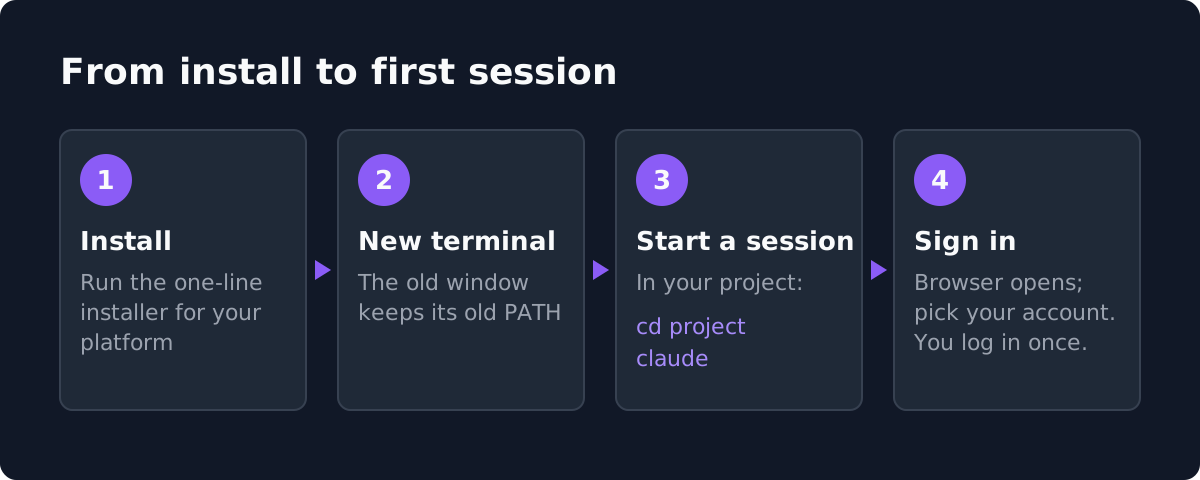
Move into a project folder and start a session:
cd /path/to/your/project
claude
On first launch Claude Code asks you to log in and opens your browser. Pick the account type you decided on earlier. If you sign in with a Claude Console account, Anthropic automatically creates a workspace called "Claude Code" in your Console organization for cost tracking. If you have already set the ANTHROPIC_API_KEY environment variable and approve it when Claude Code asks, it skips the browser login and bills that key.
Credentials are stored, so you only log in once. To switch accounts later, type /login inside a session. Type /help to see available commands.
Logging in over SSH, WSL 2 or in a container. The browser opens on a different machine than Claude Code, so the redirect cannot reach it. After you sign in, the browser shows a code; paste it into the terminal at the "Paste code here if prompted" prompt. If the browser does not open at all, press c at the login prompt to copy the URL and open it yourself, or run claude auth login, which reads the pasted code from standard input.
Verifying the Install and Keeping It Updated
Check the version. In a new terminal window, run:
claude --versionA working install prints a version number followed by "(Claude Code)". If you get "command not found" instead, jump to the errors section below.
Run the doctor. For a fuller check, run claude doctor. It prints read-only diagnostics without starting a session: install health, settings-file validation errors, the result of the last update attempt, and warnings with suggested fixes.
Updates. Native installs check for updates on startup and while running, download them in the background, and apply them the next time you launch. To update immediately, run claude update. You can switch between the "latest" channel (the default) and the "stable" channel, which runs about a week behind, under /config. Every other install method needs a manual upgrade, so put its upgrade command on your calendar or you will fall behind quickly; Claude Code ships often.
| Install method | Platforms | Auto-updates | How to update |
|---|---|---|---|
| Native installer | macOS, Linux, WSL, Windows | Yes | Automatic in the background; claude update to update now |
| Homebrew | macOS | No | brew upgrade claude-code (or claude-code@latest) |
| WinGet | Windows | No | winget upgrade Anthropic.ClaudeCode |
| apt, dnf, apk | Debian and Ubuntu, Fedora and RHEL, Alpine | No | Your normal system upgrade, such as apt upgrade or dnf upgrade |
| npm | Any system with Node.js 22+ | No | npm install -g @anthropic-ai/claude-code@latest |
VS Code, JetBrains and the Desktop App
VS Code. The Claude Code extension gives you a graphical panel with inline diffs, plan review and @-mentions. It needs VS Code 1.94.0 or later. Open the Extensions view (Cmd+Shift+X on Mac, Ctrl+Shift+X on Windows and Linux), search for "Claude Code" and install. It also installs in Cursor and other VS Code forks. One catch: the extension bundles its own private copy of the CLI and does not add claude to your PATH. If you also want to run claude in the integrated terminal, do the standalone install too.
JetBrains. The Claude Code plugin works with IntelliJ IDEA, PyCharm, Android Studio, WebStorm, PhpStorm, GoLand and most other JetBrains IDEs. Unlike the VS Code extension, it does not bundle the CLI, so install Claude Code first, then install the plugin from the JetBrains Marketplace and restart the IDE.
The desktop app. If you would rather skip the terminal entirely, the Claude desktop app for macOS and Windows has a Code tab that runs Claude Code sessions with a visual diff view, an integrated terminal and parallel sessions. A Linux build is in beta for Ubuntu and Debian. The same app includes the Chat tab and Claude Cowork for longer agentic work outside of code.
Common Claude Code Install Errors and Fixes
Most install problems come down to a handful of messages. Here is what each one means and how to fix it.
| Error | Cause | Fix |
|---|---|---|
| "command not found: claude" or "'claude' is not recognized" | The install worked, but its folder is not on your PATH (or the terminal window predates the install) | Open a new terminal; if it still fails, add the folder to PATH as shown below |
| npm permission errors (EACCES) | npm's global directory is not writable | Do not use sudo; switch to the native installer, which writes to your home directory and needs no elevated permissions |
| "syntax error near unexpected token '<'" or a 403 | The install URL returned a web page instead of the script. "App unavailable in region" means Claude Code is not available in your country; otherwise it is usually a temporary network problem or a corporate proxy | Retry after a few minutes, or install with Homebrew on macOS or WinGet on Windows |
| Login fails or loops | A login problem that a clean re-authentication fixes in most cases, per Anthropic | Run /logout, close Claude Code, start it again and log in fresh |
| "Claude Code access has not been granted for this account" | Your Team or Enterprise seat or role does not include Claude Code | Ask your admin for a seat or role that includes Claude Code |
Adding Claude Code to your PATH. On macOS with the default Zsh shell:
echo 'export PATH="$HOME/.local/bin:$PATH"' >> ~/.zshrc
source ~/.zshrc
On Linux with Bash, use ~/.bashrc in both lines instead. On Windows the binary lives at %USERPROFILE%\.local\bin\claude.exe; the installer prints a "Setup notes" line when that folder is missing from PATH, along with the fix.
Anthropic's install troubleshooting page maps dozens of other error messages to fixes.
What Claude Code Costs to Use
The install is free; using it is not. As of October 2026, Claude Code is included with Claude Pro at $20 a month ($17 a month billed annually), Max 5x at $100 a month, Max 20x at $200 a month, Team Premium seats at $125 a month ($100 billed annually) and Enterprise. It is not on the Free plan. Pro is the cheapest way in, but its allowance is shared with chat and resets on a rolling five-hour window, so full-time users usually end up on Max.
On a Console account you pay per token instead. Anthropic's own cost docs put the average across enterprise deployments at about $13 per developer per active day and $150 to $250 per developer per month, with 90 percent of users under $30 on any given day. At those numbers a Max plan is cheaper than the API for a person coding all day, and the API wins for automation, CI and anything that runs without a human at the keyboard. Our Claude Code pricing guide has the full plan-by-plan comparison, per-model API rates and the math for a two-engineer team, and Claude pricing covers every Claude plan.
Getting Claude Code Free or Discounted as a Startup or Student
Claude for Startups. Anthropic's startup program has been the best free route for founders, but it is currently closed to new applicants. Anthropic stopped taking applications on October 13, 2026, saying the current cohort is full; existing members keep their access. Anthropic's page also still says startups backed by a VC in its partner network may be eligible for up to $100,000 in additional API credits, claimed through the investor, so ask yours. Our Anthropic startup program page tracks the status, and you can sign up there for an email when applications reopen.
Cloud startup credits. Point Claude Code at Amazon Bedrock or Google Cloud's Agent Platform and the tokens bill to your cloud account, where AWS Activate or Google Cloud for Startups credits apply. With the Anthropic program closed, this is the most practical way for a funded startup to run Claude Code on credits right now.
Students. There is no student discount on Pro or Max. Students get Claude through their university if it has a Claude for Education agreement, and the Free plan does not include Claude Code. If you need Claude Code on your own, Pro billed annually is the cheapest entry. Our Claude student discount guide covers what students can actually get.
Frequently Asked Questions
How do I install Claude Code?
On macOS, Linux or WSL, run curl -fsSL https://claude.ai/install.sh | bash. On Windows PowerShell, run irm https://claude.ai/install.ps1 | iex. Then open a new terminal, run claude --version to confirm, and run claude in a project folder to sign in.
Do I need Node.js to install Claude Code?
No. The native installer, Homebrew, WinGet and the Linux package repositories all install a standalone binary. Node.js 22 or later is only needed if you install through npm.
Is the npm install of Claude Code deprecated?
No, it is still documented and supported, and it installs the same binary. Anthropic recommends the native installer because it auto-updates and avoids npm permission problems. If you use npm, never install with sudo.
Can I install Claude Code on Windows without WSL?
Yes. Claude Code runs natively on 64-bit Windows 10 (version 1809+) and later from PowerShell or CMD, without administrator rights. Git for Windows is optional. Use WSL 2 if you work in a Linux toolchain or want sandboxed command execution.
Is Claude Code free to install?
Installing is free, but using it requires a Pro, Max, Team or Enterprise subscription, a Claude Console account billed per token, or a cloud provider like Amazon Bedrock. The free claude.ai plan does not include Claude Code.
How do I update Claude Code?
Native installs update automatically in the background. Run claude update to update immediately. Homebrew, WinGet and Linux package installs need their own upgrade command, such as brew upgrade claude-code or winget upgrade Anthropic.ClaudeCode.
Next Steps
Pick your account first, then run the one-line installer for your platform, confirm with claude --version and claude doctor, and start your first session inside a real project. If you are going the API route, our Anthropic API key guide covers Console setup and spend limits, and the Claude Code pricing page will tell you whether a subscription or the API is cheaper for how you work. Founders should keep an eye on the Claude for Startups page for when applications reopen.
