

To get an OpenAI API key, sign in at platform.openai.com, open a project, go to API keys, click Create new secret key and copy it once. An OpenAI API key is the credential that lets your code call GPT models. Creating one takes a few minutes on the OpenAI platform, and you can run a first test request before paying anything. This guide walks through creating the key the right way (as a project key, not a legacy user key), what usage costs, the usage tiers that set your limits, how to keep the key safe, and the legitimate routes to OpenAI API usage you do not pay for yourself.
What an OpenAI API Key Is (and Isn't)
ChatGPT and the OpenAI API are separate products with separate billing. A ChatGPT subscription is for a person using the chat app. An API key is for software: your backend, a script, an agent, a CI job. The key belongs to an organization and project on the OpenAI platform, and every request made with it is metered per token and billed to that organization.
This is the most common confusion behind searches for a "ChatGPT API key." OpenAI's help center is explicit that ChatGPT Plus does not include API usage; API usage is billed independently to an OpenAI API account. Paying for Plus gives you no API credit, and buying API credit gives you no ChatGPT features. If you want to build a product, you need the platform account, whatever plan you have in ChatGPT.
You also do not strictly need an OpenAI key to use OpenAI models. Azure OpenAI serves the same model families inside Microsoft Azure, where you authenticate with Azure credentials and usage lands on your Azure bill. That matters because Azure credits are much easier for a startup to get than OpenAI's own, which we cover below.
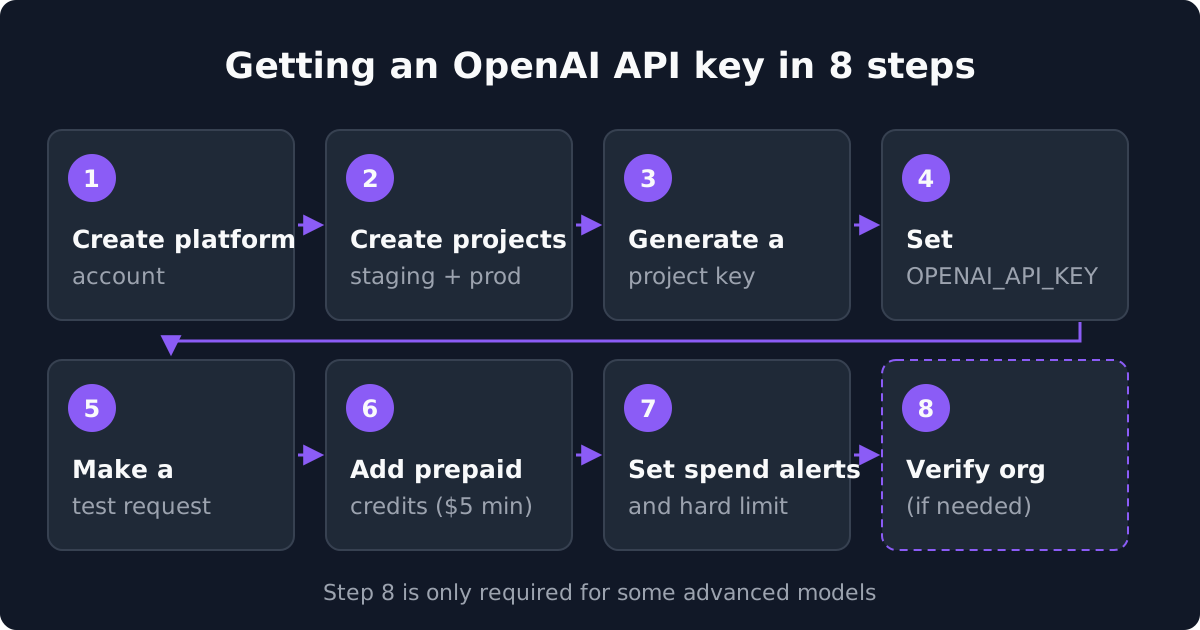
How to Get an OpenAI API Key: Step by Step
Step 1: Create a platform account. Go to platform.openai.com and sign up. Use your company email, not a personal Gmail. The organization you create here is the one OpenAI's startup team asks for (by org ID) when credits are granted, so it should belong to the company, not to whoever signed up first.
Step 2: Create projects before you create keys. Every organization starts with a default project. Projects let you separate keys, rate limits and spend limits by environment or product. OpenAI's production guide recommends separate projects for staging and production, with user access to production restricted and custom rate and spend limits on each. Set that up now so every key is scoped correctly from day one.
Step 3: Generate a project key. Open the API keys page in the dashboard, choose the project and create a key with a name that says where it will live ("prod-backend", "ci-eval"). OpenAI strongly recommends setting an expiration date when you create a project key. The secret is shown once, so copy it into your secrets manager immediately. If you lose it, revoke it and make a new one. For production systems, consider a service account key, which belongs to the project rather than to an individual person; administrators can even require that all new keys be service account keys.
Avoid legacy user keys. Older tutorials show keys that are tied to a user and reach every organization and project that user belongs to. OpenAI's API reference now calls these legacy user API keys. They still work, but a leak exposes everything that person can touch. Use project keys instead.
Step 4: Put the key in an environment variable. OpenAI's SDKs read OPENAI_API_KEY from the environment automatically. Export it in your shell or set it in your deployment platform's secrets. Never paste it into source code, a notebook that gets committed, or a browser or mobile bundle.
Step 5: Make a test request. Install the Python or JavaScript SDK and send a short request. OpenAI's quickstart lets you run a free test request before adding credits. Point it at a cheap model such as gpt-6-luna while you confirm the integration works, then check that the request shows up on the Usage page. An authentication error usually means the key was copied incompletely or belongs to a different project than you expect.
Step 6: Add prepaid credits. New API accounts are billed in advance: you buy credits, and usage draws them down. According to OpenAI's help center, the minimum purchase is $5, auto-reload is turned on by default during setup, and purchased credits expire after one year. Buying your first $5 also moves your organization into the Build usage tier, which raises your limits.
Step 7: Set spend alerts and a hard limit. On the limits page, set spend alerts that email you past a dollar amount, and hard spend limits that stop traffic once tracked spend reaches the cap. A runaway loop against a flagship model can spend real money overnight. Set the cap before you deploy, not after the first surprising invoice. Consider turning auto-reload off until you trust your usage pattern.
Step 8 (sometimes): Verify your organization. OpenAI gates some advanced models behind API Organization Verification. You start it under Settings, Organization, General, and it requires a valid government-issued ID from a supported country that has not verified another organization in the past 90 days. OpenAI's help center says retries are not currently supported, so submit a clean photo of the real document rather than a scan or screenshot. If you only need the standard models, you can skip this.
This short walkthrough shows signing in to the OpenAI platform, adding payment details, and creating and saving a new secret key.
What Using the Key Costs
The key itself is free. Usage is billed per million tokens, with input and output priced separately. As of October 2026, OpenAI's current lineup is the GPT-6 family, with GPT-6 Astra as the flagship OpenAI recommends if you are unsure where to start. The previous generation is still on sale.
| Model | Positioning | Input / 1M tokens | Output / 1M tokens |
|---|---|---|---|
| gpt-6-astra | Flagship; OpenAI's default pick | $10 | $50 |
| gpt-6.1-sol | Near-Astra performance at lower cost | $2 | $10 |
| gpt-6-luna | Efficient, high-volume | $0.10 | $0.50 |
| gpt-5.6-sol | Previous generation | $4 | $20 |
| gpt-5.5 | Previous generation | $5 | $30 |
| gpt-5.4 | Previous generation | $2.50 | $15 |
Repeated prompt prefixes bill at a much lower cached-input rate (for example $1 instead of $10 on Astra, and $0.10 instead of $2 on gpt-6.1-sol). The Batch API is roughly 50 percent off for asynchronous work, and Fast processing costs roughly double.
For a sense of scale, a short exchange of 500 input and 200 output tokens on gpt-6.1-sol costs about $0.003. Triaging 10,000 support tickets at 3,000 input and 700 output tokens each on gpt-6-luna is about $6.50. A long agent session on gpt-6-astra with 50,000 input and 15,000 output tokens is about $1.25 before caching. Our OpenAI API pricing page has the full rate table, the Batch and Flex discounts and more worked examples.
Rate Limits and Usage Tiers
Every key is subject to rate limits set at the organization and project level, not by the key itself. Older guides describe Tier 1 through Tier 5. OpenAI's current docs use four tiers, and your organization moves up automatically as its total credit purchases reach each threshold:
| Tier | Qualifies at | Monthly usage limit |
|---|---|---|
| Free | Allowed geography | $100 |
| Build | $5 in total credit purchases | $500 |
| Launch | $100 in total credit purchases | $5,000 |
| Grow | $500 in total credit purchases | $200,000 |
The monthly usage limit is OpenAI's approved ceiling for the organization, separate from the spend limits you set yourself.
Limits are expressed in requests per minute (RPM) and tokens per minute (TPM), plus daily limits on some models. As of October 2026, Build allows 5,000 RPM and 1 million TPM on the Astra, Sol and Terra models, and Grow allows 15,000 RPM and 40 million TPM. If you see 429 errors during a launch, that is the tier, not a bug. Because tiers are based on cumulative purchases, the fastest legitimate way up is simply buying credits you will use anyway. OpenAI also lists rate limit upgrades among the benefits of its startup program.
Keeping Your OpenAI API Key Safe
One key per environment and per service. If a key leaks, you want to revoke exactly one thing. Use projects to keep production, staging and CI keys separate, each with its own spend limit.
Never ship a key to the client. OpenAI's docs say not to expose keys in any client-side code such as browsers or apps. Calls to the API should go through your backend. If you need per-user usage tracking, do it in your own code, not by handing out keys.
Keep keys out of git. Add your .env file to .gitignore, use your platform's secret store for deployments, and turn on secret scanning in your repository host. If a key does get committed, revoke it on the API keys page the same hour; assume it was harvested the moment it hit a public repo.
Set expirations and rotate. Give project keys an expiration date and rotate them on a schedule. OpenAI's recommended order is to create the replacement, update your apps, and revoke the old key only after confirming the new one works. Rotate immediately when someone with access leaves.
Watch the Usage page. Hard spend limits cap the damage from a bug or a leak, and the Usage page shows tokens and cost by model and project. Check it during the first week of any new deployment, and keep Admin API keys, which manage the organization itself, with as few people as possible.
Can You Get a Free OpenAI API Key?
The key is always free; the question is whether the usage is. OpenAI used to give new accounts a small trial credit. Its current docs do not publish one. What they do show is a Free tier for users in allowed geographies and a free test request in the quickstart, after which you are expected to add prepaid credits. Beyond that, these are the legitimate routes to OpenAI API usage you do not pay for yourself.
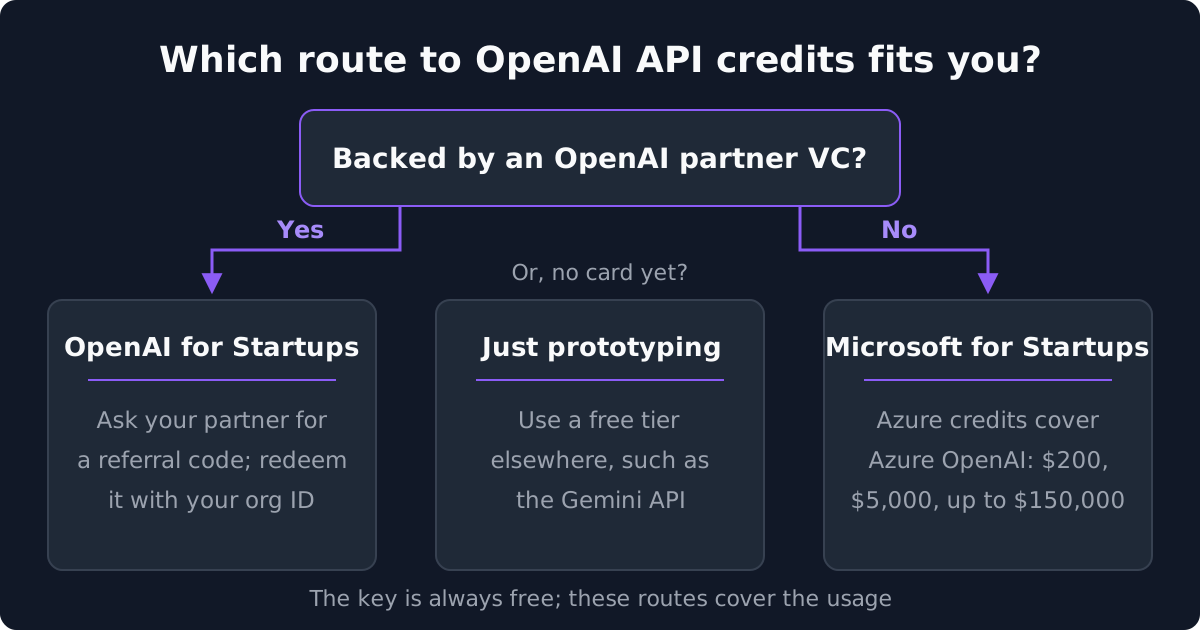
OpenAI for Startups, through a partner VC. OpenAI has no public self-serve credit application. Startups get API credits through an OpenAI partner VC (OpenAI names Thrive, Sequoia, a16z, Kleiner Perkins and Conviction), which gives you a referral code to redeem along with your platform org ID. OpenAI does not publish the credit amount. The program also lists rate limit upgrades, time with OpenAI solutions engineers and a direct line to the startup team. OpenAI Grove, its separate cohort program, closed applications on January 12, 2026. If you are backed by one of those firms, ask your partner for the code before you spend your own money. The full eligibility picture is on our OpenAI startup program page.
Microsoft for Startups, through Azure OpenAI. This is the route most founders can actually use. Azure credits pay for OpenAI models served through Azure OpenAI. Without an investor, Microsoft gives $200 in Azure credits at signup and $5,000 after business verification, with automatic upgrades up to $150,000 as your Azure usage grows. With a referral code from a participating investor, accelerator, incubator, angel network or university, you get $1,000 in starter credits immediately and a review for up to $150,000. Note that you use Azure credentials here, not an OpenAI key. Tiers and rejection reasons are on our Microsoft for Startups page.
Other providers' free tiers. If the goal is to prototype an LLM feature without a card, OpenAI is not the cheapest place to start. Google's Gemini API has a genuine rate-limited free tier, covered in our Gemini API key guide, and Anthropic's self-serve Claude for Startups program gives qualifying companies API credits, covered in our Anthropic API key guide. Many teams keep their prompts portable and run on whichever credit pool has balance left. Our startup AI credits roundup lists the rest.
What does not exist: a promo code, an unlimited free tier, or a site that can legitimately give or sell you a "free OpenAI API key." Keys posted on GitHub or sold in forums are leaked keys belonging to someone else's account. They get revoked, and using them violates OpenAI's terms.
Frequently Asked Questions
How do I get an OpenAI API key?
Sign up at platform.openai.com with a work email, create or pick a project, open the API keys page and create a project key with an expiration date. Copy the secret when it is shown; it is displayed once. Store it in an environment variable called OPENAI_API_KEY.
Is the OpenAI API key free?
Creating a key is free and the quickstart lets you run a free test request. Real usage is prepaid: you buy credits, with a $5 minimum, and usage is billed per million tokens. Startups backed by an OpenAI partner VC can get credits with a referral code, and any startup can apply to Microsoft for Startups for Azure credits that cover Azure OpenAI.
Is a ChatGPT API key the same as an OpenAI API key?
Yes. There is no separate "ChatGPT API key." The models behind ChatGPT are available through the OpenAI API with an OpenAI platform key. A ChatGPT Plus or Pro subscription does not include API usage, which is billed separately to your platform account.
How much does the OpenAI API cost per request?
It depends on tokens and model. As of October 2026, a short exchange of 500 input and 200 output tokens on gpt-6.1-sol costs about $0.003, and a long agent session on gpt-6-astra with 50,000 input and 15,000 output tokens is about $1.25 before caching. See our OpenAI API pricing page for the full table.
What are OpenAI API rate limits for new accounts?
New organizations start in the Free tier with a $100 monthly usage limit. After $5 in total credit purchases they move to Build, with a $500 monthly limit and, on the Astra, Sol and Terra models, 5,000 requests and 1 million tokens per minute. Launch and Grow follow at $100 and $500 in purchases.
Why does my OpenAI API key say I exceeded my quota?
Usually because the organization has no prepaid balance left, the key belongs to a project with a hard spend limit that has been reached, or you are still in the Free tier. Check the billing page for your credit balance, the limits page for project caps, and confirm the key belongs to the organization and project you think it does.
Next Steps
Create the platform account on your company domain today, set up separate staging and production projects, generate a project key with an expiration date and a spend limit, and confirm a test request lands on the Usage page. Then line up credits before you deploy anything real: ask your VC whether they are an OpenAI partner, and apply to Microsoft for Startups the same day. Our OpenAI startup program page keeps the credit routes current, and the OpenAI API pricing page shows what you will pay once they run out.
